

Key Takeaways
- Bank-Verified Income connects directly to a tenant's bank account through Flinks, pulling real transaction data that the tenant cannot modify or fabricate. It's the most reliable way to verify proof of income and employment during the screening process.
- Traditional income verification methods like pay stubs and bank statement uploads are easy to forge or selectively edit. Bank-Verified Income eliminates that risk by going straight to the source.
- Bank-Verified Income is available as a $10 add-on to any SingleKey screening report, making verified income data accessible without overhauling your screening process.
One of the most common questions I hear from landlords is some version of: "How do I know this tenant can actually afford the rent?"
Proof of income for rentals is incredibly important, making this a fair question. A credit score tells you how someone has managed debt, but it doesn't tell you what's hitting their bank account every two weeks. Pay stubs help, but they're easy to fabricate. Uploaded bank statements can be redacted, cherry-picked, or edited before they reach you. And for tenants who are self-employed, freelancing, or working gig jobs, there may not be a traditional T4 or pay stub to provide in the first place.
That's the gap Bank-Verified Income was built to close. It gives landlords direct access to verified bank data, pulled straight from the tenant's financial institution with the tenant's consent, so you can see proof of income, real expenses, and real account balances to give you a full picture of an applicant's affordability.
At its core, this is about a simple principle: trust, but verify. Most rental applications are honest, and most tenants report their income honestly. The strongest screening decisions come from cross-referencing what a tenant tells you against an independent and verifiable source you can rely on. Bank-Verified Income is that source. It lets you line up the income claimed on an application against the actual transactions hitting the account. Additionally, it gives tenants with non-standard financial profiles a way to shine during the application process when their most recent pay stub alone doesn't tell the full story on what they can actually afford.
In this article, I'll walk you through what Bank-Verified Income is, how it works, what you'll see in the report, and why the data you're getting is trustworthy.
Why traditional proof of income can be hard to verify
Most landlords ask for proof of income as part of the rental application process. The limitation with traditional documentation is that it only reflects what an applicant chooses to submit, which means a landlord may be reviewing income information that's incomplete, out of date, or hard to verify.
| Method | What it can show | What landlords may still need to verify |
|---|---|---|
| Pay stubs | Recent employment income and pay frequency | Whether the pay stub is real, current and consistent with the application |
| Employment letters | Employer, role, status and sometimes salary | Whether they're still employed and deposits match stated income |
| Uploaded bank statements | Deposits, balances and spending patterns | Whether pages were removed, redacted or edited before upload |
| Tax documents | Annual income from a previous tax year | Whether the income is current and enough to support the rent |
These documents can still be useful, but they rely on information the applicant provides. Verified bank data can add confidence by helping landlords compare reported income against data pulled directly from the applicant's financial institution.
What is Bank-Verified Income?
Bank-Verified Income is an income verification tool built into SingleKey's tenant screening report. It helps you verify an applicant's income using bank data, rather than relying on documents such as pay stubs or bank statements.
Bank-Verified Income uses Flinks, the same secure financial data infrastructure trusted by major Canadian banks and financial institutions, to pull data directly from a tenant's bank account with their consent. Once the tenant connects their account, the data flows from their financial institution into the screening report. There are no documents to upload, screenshots to take or figures to manually enter. The tenant can choose which accounts to include, such as chequing or savings, but the data itself cannot be modified in transit.
The report shows verified deposits, recurring expenses and account balances over a set period, giving you a clearer view of an applicant's financial picture. This can be especially helpful when screening self-employed applicants, freelancers, gig workers, students, newcomers to Canada or anyone with variable income that may be harder to verify through standard documents alone.
Bank-Verified Income pricing: Available as a $10 add-on to any SingleKey screening report. A SingleKey screening report is $29.99; with Bank-Verified Income, the report is $39.99.
Ready to verify income on your next screening report?
Add Bank-Verified Income to any SingleKey screening report and review verified income alongside credit, identity and application details.
How Bank-Verified Income works
Bank-Verified Income is designed to fit into the tenant screening process. When added to a SingleKey screening report, the applicant is invited to connect their bank through Flinks. Once connected, verified income data appears in the report automatically.
For the landlord
- Order a tenant screening report through SingleKey as you normally would.
- Select Bank-Verified Income as an add-on during checkout.
- Your tenant receives an invite to complete their screening, which now includes a prompt to connect their bank.
- Once the tenant connects, the Bank-Verified Income data populates automatically in your screening report.
For the tenant
- Open the screening invitation from their landlord.
- Select their bank from the Flinks portal and log in with their existing banking credentials.
- Authorize the connection and choose which accounts are included in the report.
- Once connected, the data is pulled directly from the bank.
There's nothing to upload, scan or manually enter. The entire process takes most tenants under five minutes. The report is typically available to the landlord within minutes of the tenant completing the connection.
What you'll see in the report
Once Bank-Verified Income data is available, you'll find a dedicated section in your screening report. As you review it, look for patterns in the data: whether income is consistent, expenses appear manageable, and the applicant's bank activity supports the income reported in their application. Here's what each part shows you.
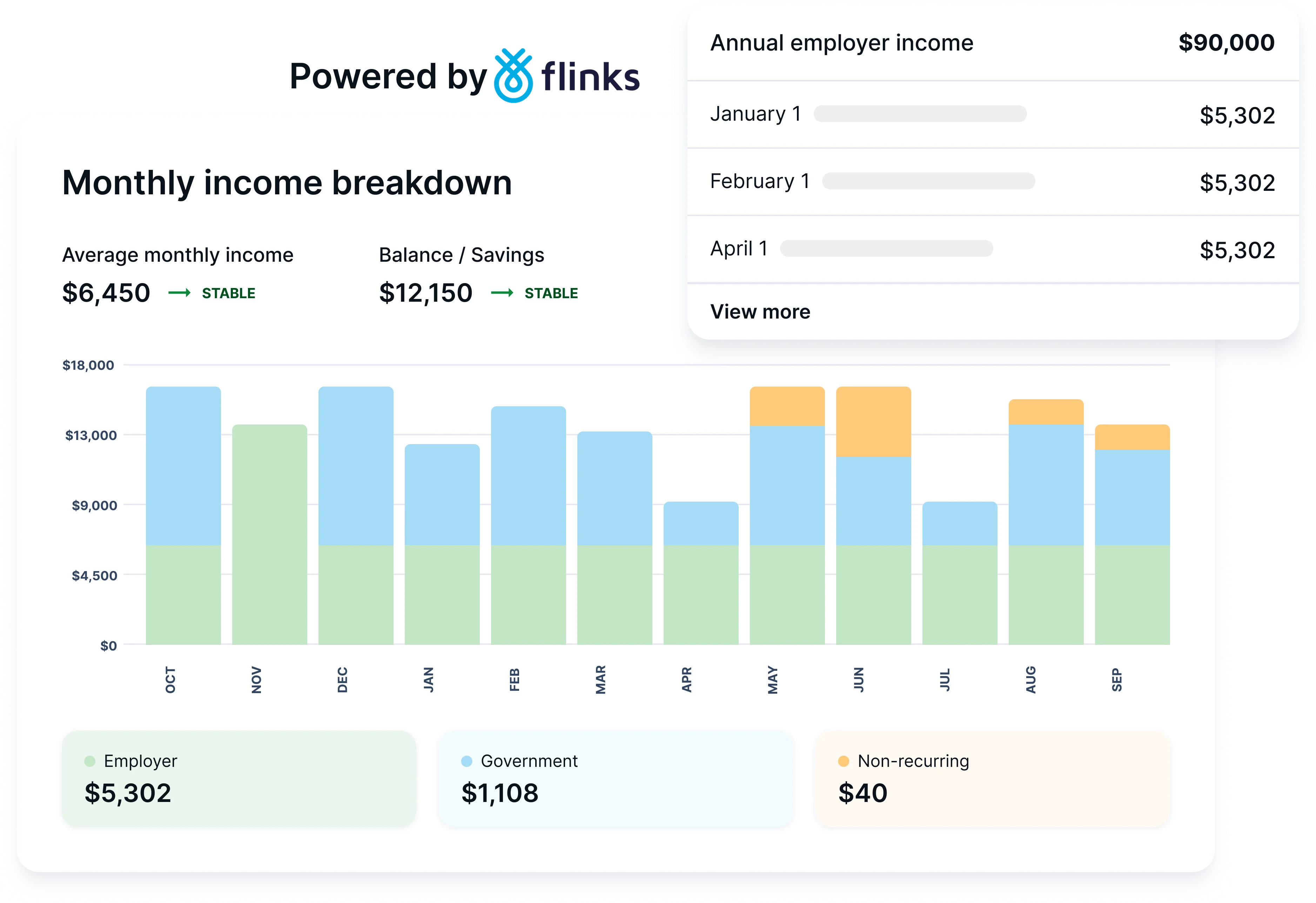
Monthly income breakdown by income source, powered by Flinks
Verified monthly income and expenses
At the top of the Bank-Verified Income section, you'll see bar charts showing the tenant's monthly income and expenses over recent months. This gives you an immediate visual of whether their income is consistent, growing, or declining, and how their spending compares month over month.
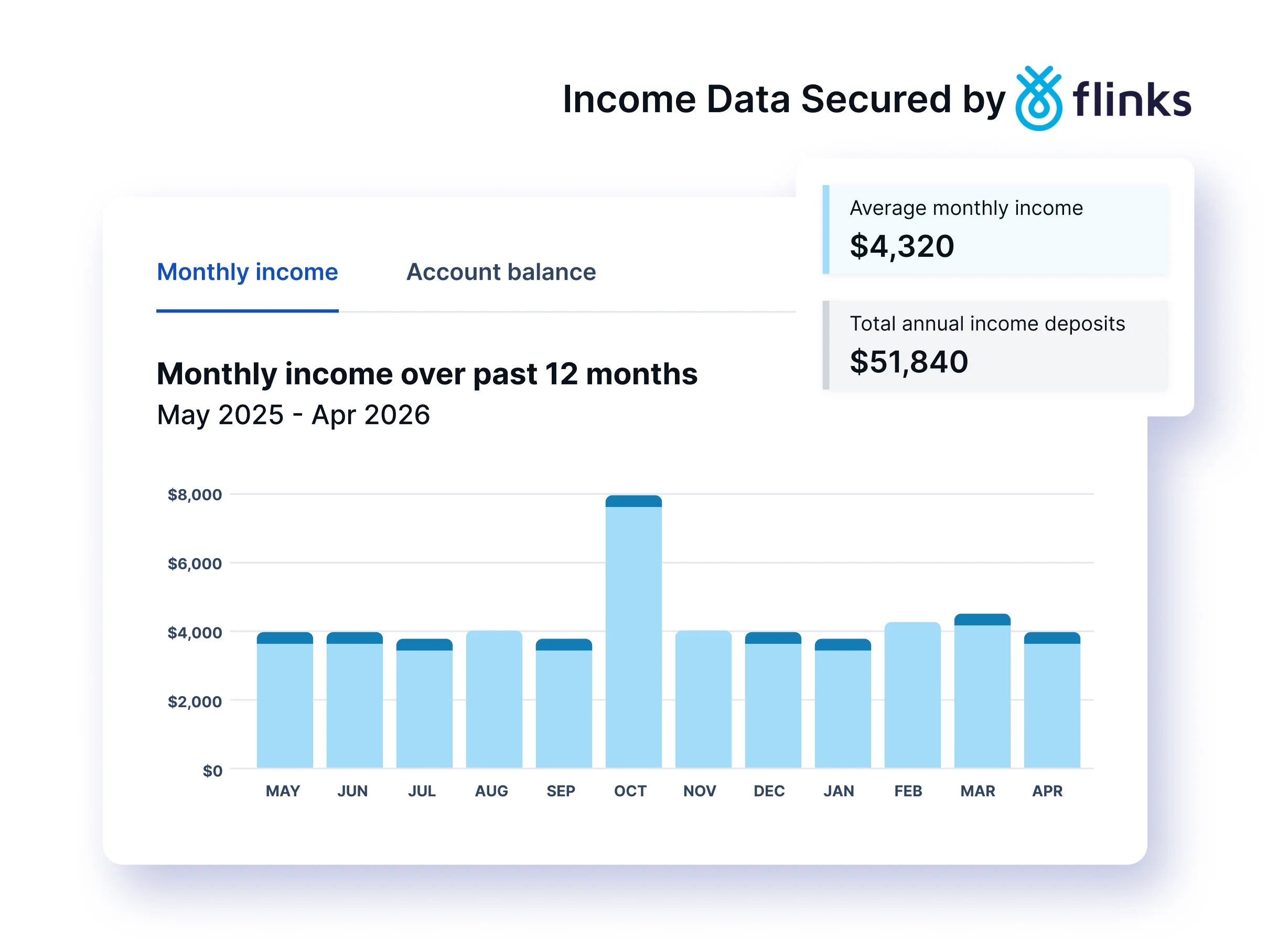
Monthly income over 12 months, with average monthly income and total annual income deposits
Mac's Pro Tip
Look for consistency here, not just the total. A tenant earning $4,000 per month for six straight months is a stronger signal than someone who earned $8,000 one month and $1,500 the next. For gig workers or freelancers, some variation is normal, but the overall trend should be stable or upward.
Monthly income and balance trends
Below the bar charts, you'll find line charts tracking income trends and account balance patterns over several months. These help you understand the tenant's financial trajectory and how their account balances have moved over time.
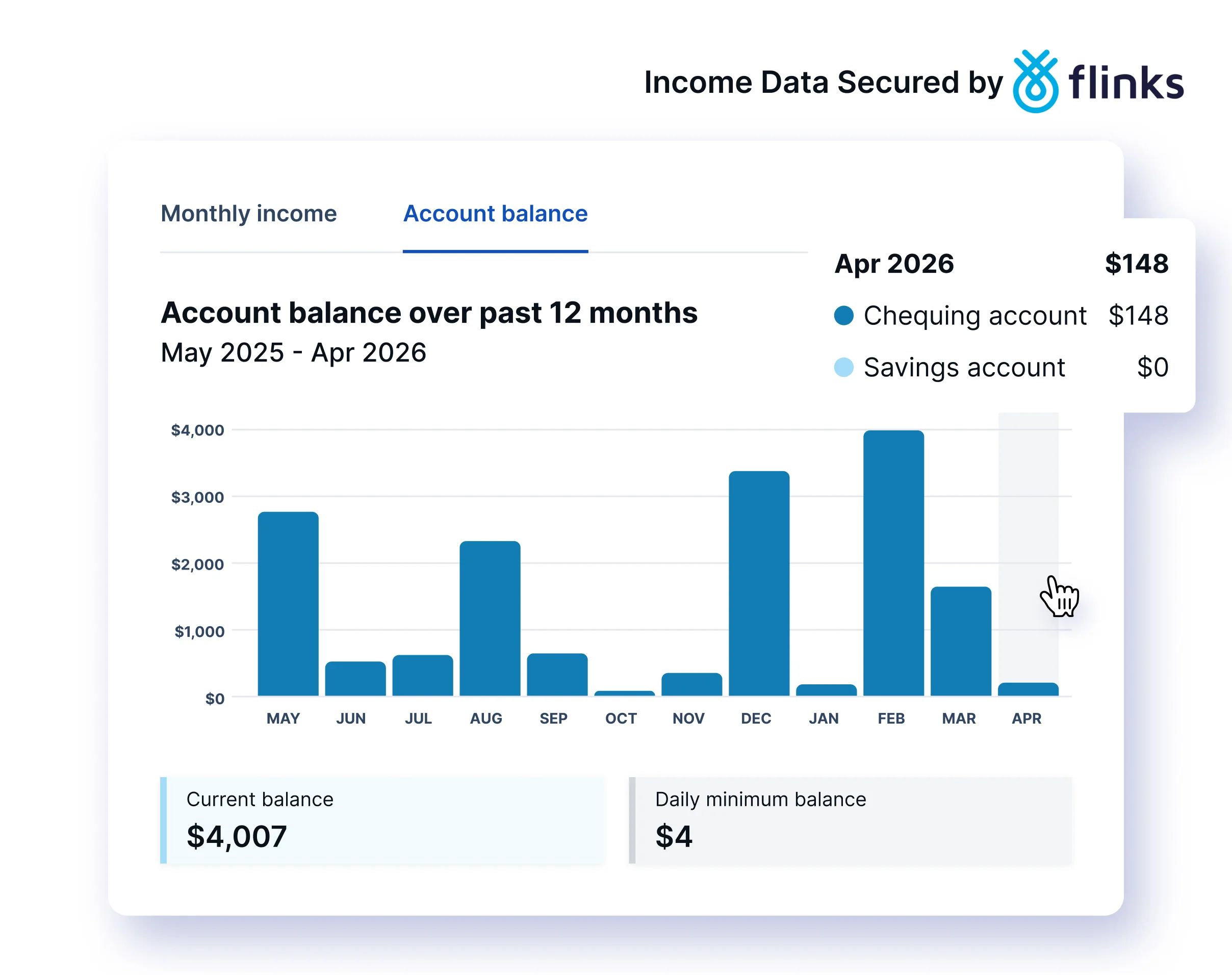
Account balance over 12 months, showing current balance and daily minimum balance
Income assessment snapshot
This section gives you the key numbers at a glance:
- Current balance: across connected accounts
- Average monthly income: over the reporting period
- Average monthly expenses: over the reporting period
- Total number of transactions: analyzed
These figures are calculated from actual bank transaction data, not from anything the tenant has self-reported.
Detailed income breakdown
This is where the report gets granular. Bank-Verified Income categorizes the tenant's income into specific streams:
- Employer income: regular deposits from identified employers, with individual transactions listed
- Non-employer revenue: freelance payments, e-transfers and other non-payroll income
- Government support: specific government payments, such as EI, CRA deposits and provincial benefits
- Government income: broader government-sourced deposits
Each category shows a total and lists the individual transactions that make it up, including dates, descriptions and amounts.
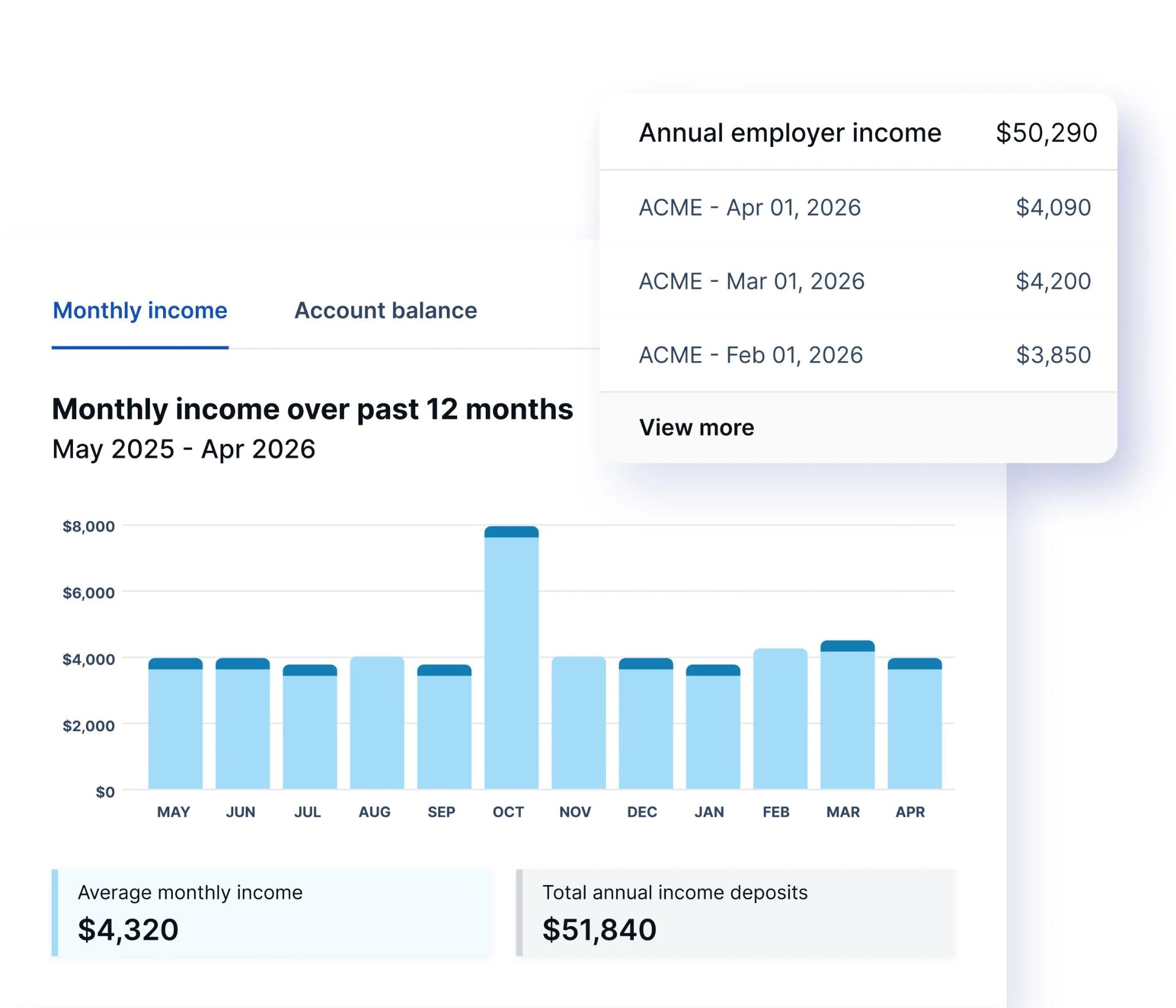
Employer income transactions with individual deposit dates and amounts
Confidence scoring
Bank-Verified Income distinguishes between verified income (transactions the system has matched to known income patterns with high confidence) and suggested income (transactions that appear to be income but require the landlord's judgment). This transparency helps you understand exactly how much of the reported income is confirmed versus inferred.
Why you can trust the data
This is the question I hear most often, and it's the right question to ask. If trust-but-verify is the principle, the data doing the verifying had better be solid. You need to know the numbers you're basing a tenancy decision on are legitimate, not just plausible.
The data comes directly from the bank. When a tenant connects through Flinks, the information is pulled from their financial institution's systems. It doesn't pass through the tenant's hands. There's no document for them to edit, no file for them to upload, and no screenshot for them to crop.
The tenant cannot modify the transaction data. Unlike traditional bank statement uploads, where a tenant could edit a PDF or selectively share certain pages, Bank-Verified Income pulls the complete transaction history for the authorized period. The tenant authorizes the connection, but they don't control what data comes through.
Flinks uses bank-grade security. Flinks uses bank-grade security. Flinks protects financial information with encryption and secure transfer processes. Tenant banking credentials are never stored by SingleKey.
You're seeing real transactions. Every deposit, withdrawal and balance shown in the report corresponds to an actual transaction recorded by the bank. This isn't self-reported income. It isn't a manually entered estimate.
In practice, this is what makes Bank-Verified Income work as a verification layer. The application says the tenant earns $6,000 a month. Does the bank data back that up? The reference letter names a specific employer. Do the deposits line up? The cross-reference is what turns an application from a set of claims into a confirmed picture.
For landlords, that means income-based decisions you can stand behind. For tenants, it means their real financial picture speaks for itself, even when traditional pay stubs or employment letters can't tell the whole story.
Frequently asked questions
Does Bank-Verified Income replace a credit check?
No. Bank-Verified Income verifies income, while a credit check shows how an applicant has managed credit, debt and payment obligations. Together, they give you a more complete view of the applicant through SingleKey's Tenant Screening Report, which can include an Equifax, TransUnion or Dual Credit Report.
Can tenants edit the bank data shown in the report?
Tenants can choose which accounts to include, such as chequing or savings, but they cannot edit the transaction data shared through the bank connection.
Is Bank-Verified Income useful for self-employed applicants?
Yes. For self-employed applicants, freelancers, gig workers and others with variable income, it surfaces income activity that may not be reflected on a standard pay stub.
Can Bank-Verified Income help identify inconsistencies in an application?
Yes. Landlords can compare the income stated on an application against verified bank data. If the two don't align, it gives landlords a clear reason to review the application more closely.
How much does Bank-Verified Income cost?
Bank-Verified Income is available as a $10 add-on to any SingleKey screening report.
Verify tenant income with Bank-Verified Income
Bank-Verified Income is available as a $10 add-on to any SingleKey tenant screening report. Add it at checkout and get verified bank data alongside credit, identity and rental history in one place.
Start a screening report